CANVA Reading Journal Templates: Your Complete KDP Interior Solution
For anyone stepping into the world of self-publishing or looking to create meaningful gifts, the gap between a great idea and a printable file often feels like a canyon. You know the content you want, but wrestling with page dimensions, bleed settings, and layout consistency can halt a project before it starts. This is where having a reliable, pre-structured foundation changes everything. The CANVA Reading Journal Templates bundle is built for this exact purpose, offering a complete, professional interior designed for a 6x9 inch format, ready for Kindle Direct Publishing or personal printing.
What Exactly Is This Reading Journal Interior?
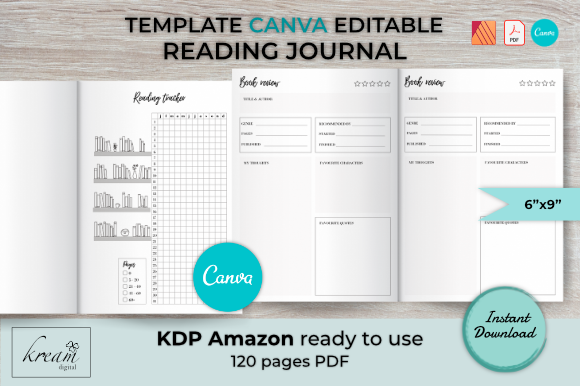
Think of this not as a single template, but as a fully realized book interior system. It’s a collection of 120 pages, meticulously formatted to the 6x9 inch standard that works beautifully for journals, planners, and notebooks on Amazon KDP. The core appeal lies in its balance of structure and flexibility. You receive the finished product as a high-resolution PDF, quality-checked and ready for immediate upload to KDP. This eliminates the technical guesswork around margins, gutters, and file specifications that trips up many first-time publishers.
Alongside the ready-to-use PDF, you get the fully editable source file made in Canva, using the free version. This means you’re not locked into the design as-is. Every page, every line, every piece of decorative text is accessible. You can change fonts, adjust colors, add your own branding elements, or completely restructure the pages to suit a specific niche. For those working in Affinity Publisher, the bundle also includes the source file with master pages set up, offering another layer of professional editing control.
Anatomy of a Functional Reading Journal
The true value of this interior is in its thoughtful organization. It’s designed to track a reader’s entire relationship with books, not just what they’ve finished. The eight template types cover every practical need a book lover has. It starts with a "Belongs to" page, a simple but personal touch that makes the journal feel owned and special. From there, the system unfolds logically.
A dedicated Reading Tracker page provides a high-level view of annual goals or monthly progress. The Books I've Read section is the journal's backbone, offering structured pages to log titles, authors, dates, and ratings. The counterpart, Books I Want to Read, acts as a curated wishlist, preventing that "what should I read next?" paralysis. For the analytically minded reader, the Book Review pages offer space for deeper reflection, encouraging critical engagement with the material.
The templates also acknowledge the social side of reading. Pages for Books Lent Out and Books Borrowed are incredibly practical for anyone who shares their library, helping to avoid the all-too-common mystery of a missing book. Finally, the Favourites Books section creates a curated hall of fame, a joy to look back on year after year. This comprehensive approach means you can create many variations of no-content and low-content books from this single source material. Imagine a specialized journal for fantasy novels, a book club log, or a gift for a graduating student—all are possible by editing these core templates.
Practical Applications Beyond the Standard Journal
While the primary use case is clear, the flexibility of this Canva template system opens doors to other creative projects. The consistent 6x9 inch dimension is a sweet spot, making it ideal for more than just a yearly journal.
- Niche-Specific Notebooks: Use the base layout to create a "Mystery Lover's Reading Log" or a "Historical Fiction Journal." Change the cover, adjust the header text on the interior pages, and you have a targeted product for a specific audience.
- Book Club Kits: The review and tracker pages are perfect for book club members. You could create a quarterly journal for your club, complete with discussion question prompts on the review pages.
- Gifts and Merchandise: The personalizable "Belongs to" page and overall aesthetic make this an excellent starting point for a thoughtful, handmade gift for the bookworm in your life. For small business owners, it’s a potential product line with minimal design overhead.
- Digital Planners: While the PDF is print-ready, the editable Canva file allows you to export individual pages as PNGs or JPGs for use in digital planning apps like GoodNotes or Notability.
Getting Started: From Editable Template to Finished Book
The workflow is designed to be straightforward. If you choose to customize, you simply open the Canva link, make your edits—perhaps swapping the default serif font for a modern sans-serif to change the mood—and then download the file as a Print PDF. The bleed settings are already configured correctly for KDP, so you upload, enter your details, and publish.
For those using Affinity Publisher, the master page setup is a significant time-saver. It ensures that elements like page numbers and running headers are consistent throughout the 120-page document, which is a hallmark of professional interior design. This attention to technical detail means you can focus your energy on the creative aspects and marketing, rather than troubleshooting file errors.
Who Is This For?
This resource is ideal for the entrepreneur testing the low-content book market, the blogger wanting to offer a unique freebie to their audience, or the hobbyist who loves creating personalized items. It’s for the marketer who needs a branded notebook for a client gift and the publisher looking for a reliable, scalable interior format. The fact that it’s built in Canva, a tool many are already familiar with, removes a significant barrier to entry. It provides a professional framework that elevates your project, ensuring the final product looks and feels like a quality item, whether you’re printing one copy or selling thousands.