Procreate Greeting Card Templates: Streamline Your Design Workflow
There’s a unique frustration that strikes when you’re sitting in front of a blank digital canvas. You have the idea, you have the stylus, and you have the creative drive, but the technical setup—ensuring the resolution is high enough, the bleed is correct, and the fold line is accurate—can drain your energy before you even sketch your first stroke. For designers, crafters, and small business owners using the iPad, Procreate has become the industry standard for sketching and illustrating, but setting up print-ready files can still be a chore. This is precisely where a robust set of Procreate Greeting Card Templates changes the game, allowing you to focus entirely on the artwork rather than the technical specifications.
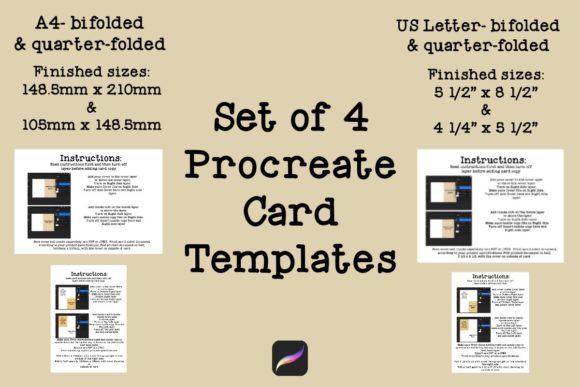
The set in question isn't just a collection of random files; it is a curated toolkit designed for versatility and global compatibility. It features four distinct Procreate Greeting Card Templates, split evenly between the two most common paper sizes used worldwide. You get two templates for the US Letter size (8.5” x 11”) and two for the international A4 size (210mm x 297mm). This dual-format approach ensures that whether you are printing at home in North America or shipping designs to clients in Europe, you have a file that fits the paper perfectly without awkward cropping or scaling.
Designing for Print: One-Sided vs. Two-Sided Workflows
Understanding the anatomy of a greeting card is vital for a professional finish, and these templates handle that complexity for you. The set includes one template for each size designed for single-page printing. This is the classic "fold and write inside" approach where you print the cover, fold the paper, and handwrite your message. It is perfect for quick projects, holiday cards, or when you want a clean, blank interior for personal notes. The canvas is pre-measured to ensure your focal artwork sits correctly on the front panel, taking the guesswork out of alignment.
However, the real value for professional designers and entrepreneurs lies in the second template included for each size. These are specifically engineered for double-sided printing. If you have ever tried to print a card where the image wraps around, only to have the front and back misaligned by a millimeter, you know the headache. These Procreate Greeting Card Templates are set up to match standard printer specifications, allowing you to design the front cover and the back cover (or an inside message) simultaneously. This is essential for small business owners looking to add branding to the back of their cards or marketers creating direct mail pieces that require a polished, commercial finish.
Each template comes with built-in instructions, which serves as a safety net. Even if you are new to editorial design or print production, the guides explain where the fold will hit and how the orientation should be set up in your printer dialog. It bridges the gap between digital creation and physical print reality.
Visual Style and Creative Appeal
While these are structural design assets rather than typefaces, their visual impact lies in the framework they provide. The "personality" of these templates is clean, unobtrusive, and professional. They do not dictate a specific art style; rather, they act as a neutral stage. Whether you are working on a rustic, handwritten font design for a wedding invitation or a bold, modern typography layout for a corporate holiday card, the template supports your vision.
The appeal here is one of professionalism and consistency. When you use a standardized template, your output looks "finished." It removes the amateur mistake of text being too close to the edge or graphics being cut off by the printer margins. For crafters and hobbyists, this means your handmade creations look store-bought (in the best way possible). For entrepreneurs, it ensures your physical touchpoints match the quality of your brand identity.
Integrating Typography and Branding
A greeting card is rarely just an image; it is a vehicle for a message. Therefore, how you handle typography within these Procreate files is critical. Because the templates are high-resolution, you have the freedom to experiment with various font styles. You might pair a delicate script font for the headline with a legible sans serif font for the sub-copy.
When designing within these templates, consider the visual hierarchy. The front of the card usually demands a display font or a premium font with high impact—something that grabs attention immediately. However, if you are using the double-sided template for an internal message, you need to switch gears to readability. A serif font often works best for longer blocks of text inside a card, as it guides the eye comfortably across the page.
For those building a brand identity, these templates allow you to standardize your packaging design elements. You can save a version of the template with your logo and URL already placed on the back cover, turning every custom card you create into a marketing tool. This is a subtle but effective way to use print materials to support your web design and social media graphics efforts, creating a cohesive ecosystem for your brand.
Practical Application and Workflow Tips
To get the most out of these files, you need to think about your production method. If you are selling digital downloads, you can create your art in Procreate, place it into the template, and export a PDF for your customers. If you are printing at home, the instructions included with the Procreate Greeting Card Templates are your best friend. Pay attention to the "mirror" or "flip" settings often required for duplex printing.
Here are a few practical recommendations for using these assets effectively:
- Check Your Margins: Even with a template, keep your critical text and design elements slightly inward from the trim line. This "safety margin" prevents accidental cropping.
- Font Pairing: Use the A4 or Letter space to experiment with font pairing. A bold creative font on the cover paired with a standard commercial font inside creates a nice balance between flair and function.
- Paper Stock Matters: These templates are designed for standard home printers, but the artwork you create in Procreate can be high-impact. Consider using a heavier cardstock (65lb or higher) to give the final product a tactile, premium feel that matches the digital quality.
- Commercial Licensing: If you are a publisher or content creator selling these cards, ensure your Procreate brushes and the fonts you use within the templates have commercial licenses. The template itself is a tool to facilitate your business, but the assets inside must be cleared for sale.
Ultimately, these Procreate Greeting Card Templates remove the friction from the creative process. They allow designers, bloggers, and marketers to move from concept to tangible product with speed and confidence. By handling the technical specifications of US Letter and A4 sizes, they free you up to do what you do best: create meaningful connections through design. Whether you are launching a stationery line or simply sending a thank-you note to a client, having a reliable structural foundation ensures your message is delivered with clarity and style.