Buttons Bundle Mockups: Your Ultimate Design Toolkit
Creating a strong brand identity often comes down to the small details. Whether you're a designer finalizing a client's merch, an entrepreneur launching a new product line, or a crafter looking to sell unique pins, having the right design assets is crucial. This is where the Buttons Bundle Mockups & Templates file becomes an indispensable part of your creative arsenal. It’s a comprehensive digital resource designed to help you visualize and present your button designs with professional polish and ease.
What Exactly Is This Digital Mockup Bundle?
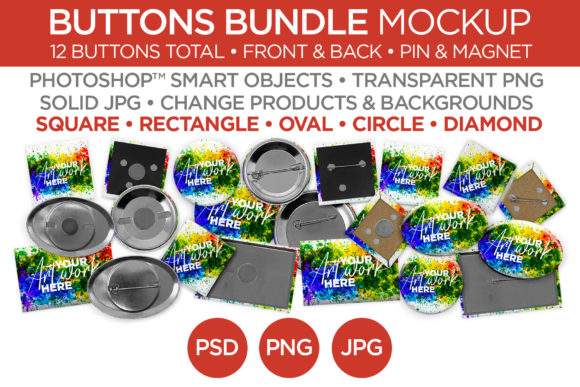
First and foremost, it's important to understand that this is a digital file, not a physical product. You won't receive a box of printed buttons. Instead, you get instant access to a collection of high-quality, editable mockup and template files. Think of it as a professional photoshoot for your button designs, already completed for you. The bundle includes a wide variety of shapes and sizes, each with two versatile backing options: a classic pin back and a rare earth magnet back. This variety allows you to showcase exactly how your final product will look.
The included mockups cover a comprehensive range, ensuring you have the right presentation for any project:
- 2.5" and 1.5" Circle Buttons – The timeless standard for promotional and personal buttons.
- 1.5" Diamond Buttons – A unique, eye-catching shape for designs that need to stand out.
- 2" Square Buttons – Perfect for modern logos, icons, or minimalist artwork.
- 2x3" Rectangle Buttons – Ideal for name tags, event badges, or horizontal designs.
- 1.5 x 2.25" Oval Buttons – A classic, slightly more formal shape that works beautifully for vintage-inspired or elegant designs.
Each shape comes with both pin and magnet back options, giving you a total of twelve distinct mockup scenarios. This isn't just a collection of static images; these are editable templates that allow you to seamlessly integrate your own artwork, colors, and patterns into the scene.
Streamlining Your Workflow and Elevating Your Brand
The real value of the Buttons Bundle Mockups & Templates lies in its ability to save you time and enhance your professional output. For designers and marketers, time is money. Instead of spending hours setting up a physical photoshoot—arranging lighting, finding the right angles, and editing photos—you can create a stunning, realistic presentation in minutes. Simply open the file in a compatible design program, place your design into the designated smart object layer, and save. The mockup handles all the complex lighting, shadows, and textures.
This efficiency directly translates to better brand perception. When you present your products using high-quality mockups, it communicates a level of professionalism and attention to detail that builds trust with your audience. Imagine sending a client a sleek visual of their logo on a series of buttons, or listing a new pin design in your online shop with a photo that looks like it was taken by a professional product photographer. That's the kind of polish that elevates a brand identity and makes a small business look established.
Practical Applications Across Creative Fields
The uses for these mockups extend far beyond simple product displays. They are versatile design assets that can be integrated into numerous projects:
- Portfolio and Client Presentations: Show clients exactly how their logo or artwork will look on a physical product, making approvals faster and more confident.
- E-commerce Listings and Marketing Materials: Create consistent, professional-looking product images for your website, Etsy shop, or social media ads. Consistent imagery is key to building a recognizable brand.
- Social Media Content: Generate engaging posts that showcase your merchandise in a lifestyle context. A well-placed button mockup in a flat lay or on a denim jacket can tell a compelling story.
- Design Templates for Clients: If you're a designer who sells templates, you can use these mockups to create stunning preview images for your own digital products.
Choosing and Using Your Button Mockups Effectively
Getting the most out of this bundle requires a bit of strategic thinking. Start by considering the shape that best complements your design. A circular button offers a classic, friendly feel, while a square or diamond shape can convey a more modern or edgy aesthetic. The oval shape often suits vintage, boutique, or more formal designs. The backing type—pin or magnet—should also reflect the intended use of the final product.
Once you've selected the right mockup, focus on the design integration. Ensure your artwork is high-resolution to avoid any pixelation when placed into the template. Pay close attention to the mockup's lighting and shadows. A good mockup will have natural, consistent lighting that makes your design look like it's truly part of the scene. Avoid designs with extreme contrasts or details that might get lost in the mockup's texture or shadows.
Finally, think about context. Don't just show the button in isolation. Use the mockup to create a scene—a button pinned to a backpack, attached to a lanyard, or placed on a styled desk next to a notebook and pen. This contextual presentation helps potential customers envision the product in their own lives, which is a powerful driver for engagement and sales. By thoughtfully applying these mockups, you transform a simple digital file into a cornerstone of your creative and marketing strategy, ensuring your designs are always presented with the professionalism they deserve.